배수판정법: 익숙한 끝자리에서 낯선 17의 배수까지
《나머지에서 시작하는 정수론》 · 1/8편 · 배수 판정법
0. 서론: 기억을 복원하면서 시작해봅시다
2의 배수는 짝수, 5의 배수는 끝자리가 0이나 5. 여기까지는 오래전에 배운 기억이 금방 돌아올 겁니다.
3과 9는 각 자리 숫자를 더했던 것 같습니다.
4와 8은… 솔직히 잘 기억이 안날 수도 있습니다. 어렴풋이 기억에서 끌어내 보자면 끝 두 자리, 끝 세 자리를 보았던 것 같고요.
그런데 7의 배수인지 묻는 순간 손이 멈춥니다.
13이나 17도 별도의 규칙이 있을까요? 있다면 수마다 전혀 다른 요령을 외워야 할까요?
《나머지에서 시작하는 정수론》의 첫 편에서는 먼저 규칙을 실제로 써보겠습니다. 이번 편의 목표는 2부터 19까지의 배수를 판정하고, 계산 결과가 0이나 음수일 때도 뜻을 읽는 것입니다. 왜 규칙이 맞는지는 다음 편에서 자릿값과 나머지를 이용해 연결하겠습니다. 사용하는 방법과 증명하는 방법을 차례로 익히면서 처음 만나는 기호가 계산의 흐름을 가로막지 않게 작성했습니다.
숫자를 잘게 나누는 과정에서 같은 모양의 규칙이 반복해서 보일 겁니다. 특히 7·13·17·19는 끝자리 숫자에 작은 수를 곱한다는 점이 닮았습니다. 그 닮음은 우연이 아닙니다.
오늘은 그 질문을 구체적인 계산과 함께 손에 쥐고 출발합시다.
1. 배수라는 말에 0도 들어갑니다
84는 7의 배수입니다. $84=7\times12$이기 때문입니다. 여기서 중요한 것은 12가 정수라는 점입니다. 어떤 정수 $N$을 양의 정수 $n$과 정수 $q$의 곱으로 쓸 수 있다면, $N$을 $n$의 배수라고 합니다.
정수에는 양의 정수뿐 아니라 0과 음의 정수도 들어 있습니다. 따라서
이므로 0과 $-14$도 7의 배수입니다. 이것은 나중에 덧붙일 예외가 아니라 처음부터 배수의 정의에 포함된 사실입니다. 모든 양의 정수 $n$에 대해 $0=n\times0$이므로 0은 모든 양의 정수의 배수입니다.
어릴 때 “7의 배수를 말해보세요”라는 질문에 7, 14, 21부터 답한 것은 양의 배수를 나열한 것입니다. 정수 전체로 넓히면 $\ldots,-14,-7,0,7,14,\ldots$가 됩니다. 앞으로 규칙을 적용하다 0이나 음수가 나오더라도 이 정의로 돌아오면 됩니다.
입력 자체가 음수라면 부호를 떼고 판정해도 됩니다. $-203$이 7의 배수인지와 203이 7의 배수인지는 같은 질문입니다. 어떤 수를 정수 배해서 만들 수 있으면, 그 정수의 부호를 바꾸어 반대 부호의 수도 만들 수 있기 때문입니다. 아래에서는 우선 0 이상의 수로 계산하겠습니다.
2. 끝자리만 보면 되는 2·5·10
2의 배수는 일의 자리 숫자가 0, 2, 4, 6, 8입니다. 즉, 짝수죠. 138은 8로 끝나므로 2의 배수이고, 139는 아닙니다.
5의 배수는 일의 자리가 0 또는 5이며, 10의 배수는 일의 자리가 0입니다.
| 수 | 2의 배수 | 5의 배수 | 10의 배수 |
|---|---|---|---|
| 130 | 예 | 예 | 예 |
| 135 | 아니요 | 예 | 아니요 |
| 138 | 예 | 아니요 | 아니요 |
| 139 | 아니요 | 아니요 | 아니요 |
130은 세 조건을 모두 만족하지만, 135는 5의 조건만 만족합니다. 규칙을 여러 개 적용한다고 해서 결과가 항상 함께 움직이는 것은 아닙니다. 각각 어떤 수의 배수를 검사하는지 끝까지 구분해야 합니다.
이 규칙들은 숫자가 아무리 길어도 끝자리 하나만 보면 됩니다. 9876543210을 2·5·10으로 직접 나눌 필요는 없습니다. 앞의 긴 숫자가 달라져도 일의 자리가 같으면 세 판정은 그대로입니다. 뒤에서 만날 4·8·16의 규칙은 이 관찰을 두 자리, 세 자리, 네 자리로 확장합니다.
3. 자리 숫자를 더하는 3·9, 두 조건을 묶는 6
5724가 3의 배수인지 보겠습니다. 각 자리 숫자의 합은
입니다. 18이 3의 배수이므로 5724도 3의 배수입니다. 18은 9의 배수이기도 하므로 5724는 9의 배수도 됩니다.
여기서 “자리 숫자의 합이 3이어야 한다”거나 “9여야 한다”라고 읽으면 안 됩니다. 합이 각각 3 또는 9의 배수이면 됩니다. 합이 커도 같은 규칙을 다시 쓸 수 있습니다. 99999는 합이 45이고, 45의 자리 숫자를 더하면 9입니다. 어느 쪽에서 9의 배수임을 알아보든 결론은 같습니다.
반면 123은 합이 6입니다. 6은 3의 배수지만 9의 배수는 아니므로, 123은 3의 배수이고 9의 배수는 아닙니다. 같은 합을 보더라도 지금 검사하는 수가 3인지 9인지에 따라 결론이 달라집니다.
6의 규칙에서는 주의할 것이 하나 있습니다. 자리 숫자의 합이 6의 배수인지를 보는 것이 아닙니다. 다음 두 조건을 모두 만족해야 합니다.
-
원래 수가 짝수다.
-
자리 숫자의 합이 3의 배수다.
15는 합이 $1+5=6$이지만 홀수이므로 6의 배수가 아닙니다. 반대로 12는 합이 $1+2=3$이어도 짝수이면서 3의 배수이므로 6의 배수입니다. “합이 6의 배수”라는 기억으로는 두 예 모두 제대로 처리하지 못합니다.
348이라면 끝자리가 8이므로 짝수이고, $3+4+8=15$는 3의 배수입니다. 따라서 348은 6의 배수입니다. 354도 합이 12이고 짝수여서 통과합니다. 합이 6이어야 할 이유는 없습니다.
아래 그림은 0부터 35까지의 수를 두 조건으로 나눕니다. 짝수인지, 3의 배수인지 각각 확인하고 두 조건을 모두 만족하는 수를 초록색으로 표시했습니다.
그림을 만든 Python 코드
from pathlib import Path as _bfPath
from matplotlib.font_manager import FontProperties as _bfFontProperties
from matplotlib.text import Text as _bfText
from matplotlib.ticker import Formatter as _bfFormatter
from io import BytesIO as _bfBytesIO
from IPython.display import display as _bfDisplay, Image as _bfImage

class _BilingualFormatter(_bfFormatter):
    def __init__(self, base, labels):
        self.base, self.labels = base, labels
    def set_axis(self, axis):
        super().set_axis(axis)
        self.base.set_axis(axis)
    def set_locs(self, locs):
        super().set_locs(locs)
        self.base.set_locs(locs)
    def __call__(self, value, pos=None):
        raw=self.base(value,pos)
        translated=self.labels.get(raw)
        return translated+'\n'+raw if translated else raw
    def get_offset(self):
        return self.base.get_offset()

def _apply_bilingual_figure(_bfFigure, _bfLabels, _bfOriginalPixels):
    if getattr(_bfFigure, '_bilingual_complete', False):
        return
    _bfFont = _bfPath('C:/Windows/Fonts/malgun.ttf')
    if not _bfFont.is_file():
        raise RuntimeError('Korean/English figures require the Malgun Gothic font.')
    _bfFamily = _bfFontProperties(fname=str(_bfFont)).get_name()
    # Keep the delivered original's aspect ratio.  A bilingual label must not
    # stretch the chart, its grid cells, cards or geometry vertically.
    _bfFigure.set_size_inches(_bfOriginalPixels[0] / 80,
                             _bfOriginalPixels[1] / 80, forward=True)
    _bfFigure._bilingual_original_pixels = tuple(_bfOriginalPixels)
    _bfFigure.canvas.draw()
    for _bfAxes in _bfFigure.axes:
        for _bfAxis in (_bfAxes.xaxis,_bfAxes.yaxis):
            if any(_bfTick.get_text() in _bfLabels for _bfTick in _bfAxis.get_majorticklabels()):
                _bfAxis.set_major_formatter(_BilingualFormatter(_bfAxis.get_major_formatter(),_bfLabels))
    _bfTexts = list(_bfFigure.findobj(_bfText))
    for _bfAxes in _bfFigure.axes:
        for _bfTable in _bfAxes.tables:
            _bfTexts.extend(_bfCell.get_text() for _bfCell in _bfTable.get_celld().values())
    _bfSeen = set()
    _bfChanged = []
    for _bfItem in _bfTexts:
        if id(_bfItem) in _bfSeen:
            continue
        _bfSeen.add(id(_bfItem))
        _bfOriginal = _bfItem.get_text()
        _bfKorean = _bfLabels.get(_bfOriginal)
        if _bfKorean:
            _bfItem.set_text(_bfKorean + '\n' + _bfOriginal)
            _bfItem.set_linespacing(1.05)
            _bfChanged.append((_bfKorean, _bfOriginal))
        _bfProperties = _bfItem.get_fontproperties().copy()
        _bfProperties.set_file(None)
        _bfProperties.set_family([_bfFamily, 'DejaVu Sans'])
        _bfItem.set_fontproperties(_bfProperties)
    assert _bfChanged, 'Every figure must contain meaningful Korean/English labels.'
    # Bilingual column headers must stay inside their original table cells.
    _bfFigure.canvas.draw()
    _bfRenderer = _bfFigure.canvas.get_renderer()
    for _bfAxes in _bfFigure.axes:
        for _bfTable in _bfAxes.tables:
            for _bfCell in _bfTable.get_celld().values():
                _bfCellText = _bfCell.get_text()
                _bfBox = _bfCellText.get_window_extent(_bfRenderer)
                _bfCellBox = _bfCell.get_window_extent(_bfRenderer)
                if _bfBox.width and _bfBox.height:
                    _bfFit = min(1, .92*_bfCellBox.width/_bfBox.width,
                                  .88*_bfCellBox.height/_bfBox.height)
                    _bfCellText.set_fontsize(_bfCellText.get_fontsize()*_bfFit)
        if _bfAxes.get_title():
            _bfAxes.set_title(_bfAxes.get_title(), pad=6)
    _bfFigure.canvas.draw()
    # Keep subplot headings clear of the shared two-line title, moving the
    # subplot boundary only as much as the actual rendered text requires.
    if _bfFigure._suptitle is not None:
        _bfTopTitle = _bfFigure._suptitle.get_window_extent(_bfRenderer)
        for _bfAxes in _bfFigure.axes:
            if not _bfAxes.get_title():
                continue
            _bfHeading = _bfAxes.title.get_window_extent(_bfRenderer)
            _bfGap = _bfHeading.y1 - (_bfTopTitle.y0 - 9)
            if _bfGap > 0:
                _bfPosition = _bfAxes.get_position(original=True)
                _bfAxes.set_position([_bfPosition.x0, _bfPosition.y0,
                    _bfPosition.width, _bfPosition.height - _bfGap/_bfFigure.bbox.height])
    _bfFigure._bilingual_labels = _bfChanged
    _bfFigure._bilingual_complete = True

def _display_bilingual_figure(_bfFigure):
    # A fixed full canvas avoids notebook's automatic tight crop changing the
    # aspect ratio after titles and labels become bilingual.  This is a fresh
    # Matplotlib rendering, at exactly twice the original pixel dimensions.
    global _bfDisplayedFigure
    _bfDisplayedFigure = _bfFigure
    _bfBuffer = _bfBytesIO()
    _bfFigure.savefig(_bfBuffer, format='png', dpi=160, bbox_inches=None,
                      pad_inches=0, facecolor=_bfFigure.get_facecolor())
    _bfDisplay(_bfImage(data=_bfBuffer.getvalue()))
    plt.close(_bfFigure)

_bfLabels = {'Dividend': '피제수', 'Divisor': '제수', 'Quotient': '몫', 'Remainder': '나머지', '3r mod 7': '3r의 법 7 나머지', 'then x5': '그다음 5를 곱하기', 'k, gcd(k,12)=1': '12와 서로소인 k', '5k mod 12': '5k의 법 12 나머지', 'Modulus': '법', 'Other factors': '나머지 법들의 곱', 'Inverse': '역원', 'Unit part': '단위 부품', 'Target': '목표 나머지', 'Contribution': '기여값', 'Possible square residues': '가능한 제곱 나머지', 'Squares of 0, 1, ... , m-1': '0·1·…·(m−1)의 제곱 나머지', 'PASS': '통과', 'IMPOSSIBLE': '불가능', 'mod 2': '법 2', 'mod 3': '법 3', 'mod 4': '법 4', 'mod 5': '법 5', 'mod 7': '법 7', 'mod 8': '법 8', 'mod 9': '법 9', 'mod 11': '법 11', 'mod 12': '법 12', 'mod 105': '법 105', '0-35: the overlap is exactly the multiples of 6': '0~35에서 겹치는 수는 정확히 6의 배수', 'A digit sum tests divisibility by 3': '자리 합은 3의 배수 여부를 검사', '15: digit sum 1 + 5 = 6\nMultiple of 3: YES     Even: NO\nMultiple of 6: NO': '15: 자리 합 1 + 5 = 6\n3의 배수: 예   짝수: 아니요\n6의 배수: 아니요', '12: digit sum 1 + 2 = 3\nMultiple of 3: YES     Even: YES\nMultiple of 6: YES': '12: 자리 합 1 + 2 = 3\n3의 배수: 예   짝수: 예\n6의 배수: 예', 'The original number must pass BOTH tests.': '원래 수가 두 조건을 모두 통과해야 한다.', 'A multiple of 6 passes two separate tests': '6의 배수는 두 조건을 모두 통과', 'Both tests': '두 조건 모두', 'Even only': '짝수 조건만', 'Multiple of 3 only': '3의 배수 조건만', 'Neither': '둘 다 아님', 'The colored overlap includes 0.  A digit sum of 6 alone does not test divisibility by 6.': '초록 칸에는 0도 포함된다. 자리 합이 6이라는 사실만으로 6의 배수를 판정할 수 없다.'}
_bfOriginalPixels = [1265, 741]

import matplotlib.pyplot as plt
from matplotlib.patches import Rectangle, FancyBboxPatch, FancyArrowPatch

BG = "#101827"
PANEL = "#1d2b40"
INK = "#edf3fc"
MUTED = "#c0cede"
BLUE = "#8fdcff"
GREEN = "#91e0b2"
GOLD = "#ffd18c"
RED = "#ffaaaa"
LINE = "#667a96"

def blank(ax):
    ax.set_facecolor(BG)
    ax.tick_params(colors=INK, labelsize=12)
    ax.set_xlim(0, 1)
    ax.set_ylim(0, 1)
    ax.axis("off")

def text(ax, x, y, value, color=INK, size=12, **kwargs):
    settings = dict(ha="center", va="center", color=color, fontsize=size,
                    transform=ax.transAxes, linespacing=1.4)
    settings.update(kwargs)
    return ax.text(x, y, value, **settings)

def card(ax, x, y, w, h, value, edge=LINE, color=INK, size=14):
    ax.add_patch(FancyBboxPatch((x, y), w, h,
                 boxstyle="round,pad=0.012", transform=ax.transAxes,
                 facecolor=PANEL, edgecolor=edge, linewidth=1.5))
    return text(ax, x+w/2, y+h/2, value, color=color, size=size)

def arrow(ax, start, end, color=BLUE):
    ax.add_patch(FancyArrowPatch(start, end, transform=ax.transAxes,
                 arrowstyle="-|>", mutation_scale=18, linewidth=1.8,
                 color=color))

def caption(fig, value):
    fig.text(.5, .035, value, ha="center", va="center",
             color=MUTED, fontsize=12, linespacing=1.4)

fig, axes = plt.subplots(1, 2, figsize=(14, 7.6), facecolor=BG)
fig.suptitle("A multiple of 6 passes two separate tests", color=INK,
             fontsize=19, y=.975)
fig.subplots_adjust(left=.06, right=.96, bottom=.18, top=.84, wspace=.26)
ax = axes[0]
ax.set_facecolor(BG)
ax.tick_params(colors=INK, labelsize=12)
ax.set_xlim(-.1, 6.1)
ax.set_ylim(6.1, -.1)
ax.set_aspect("equal")
ax.axis("off")
for value in range(36):
    row, col = divmod(value, 6)
    even, third = value % 2 == 0, value % 3 == 0
    fill = "#245444" if even and third else ("#224b63" if even else
           ("#66512b" if third else PANEL))
    edge = INK if value in (12, 15) else LINE
    ax.add_patch(Rectangle((col+.04, row+.04), .92, .92,
                 facecolor=fill, edgecolor=edge,
                 linewidth=2.8 if value in (12, 15) else .65))
    ax.text(col+.5, row+.5, str(value), ha="center", va="center",
            color=INK, fontsize=17, weight="bold" if value in (12, 15) else "normal")
ax.set_title("0-35: the overlap is exactly the multiples of 6",
             color=INK, fontsize=14, pad=17)
legend = [("#245444", "Both tests"), ("#224b63", "Even only"),
          ("#66512b", "Multiple of 3 only"), (PANEL, "Neither")]
for i, (color, label) in enumerate(legend):
    x, y = .07+(i % 2)*.24, .125-(i//2)*.047
    fig.add_artist(Rectangle((x, y-.009), .014, .021,
                   transform=fig.transFigure, facecolor=color, edgecolor=LINE))
    fig.text(x+.022, y, label, color=INK, fontsize=12, va="center")
ax = axes[1]
blank(ax)
text(ax, .5, .99, "A digit sum tests divisibility by 3", color=BLUE, size=15)
card(ax, .02, .58, .96, .28,
     "15: digit sum 1 + 5 = 6\nMultiple of 3: YES     Even: NO\nMultiple of 6: NO",
     edge=GOLD, size=15)
card(ax, .02, .16, .96, .28,
     "12: digit sum 1 + 2 = 3\nMultiple of 3: YES     Even: YES\nMultiple of 6: YES",
     edge=GREEN, size=15)
text(ax, .5, .035, "The original number must pass BOTH tests.", color=GREEN, size=13)
caption(fig, "The colored overlap includes 0.  A digit sum of 6 alone does not test divisibility by 6.")
assert all((n % 6 == 0) == (n % 2 == 0 and n % 3 == 0) for n in range(10000))
assert 15 % 6 != 0 and 12 % 6 == 0
_apply_bilingual_figure(plt.gcf(), _bfLabels, _bfOriginalPixels)
_display_bilingual_figure(plt.gcf())
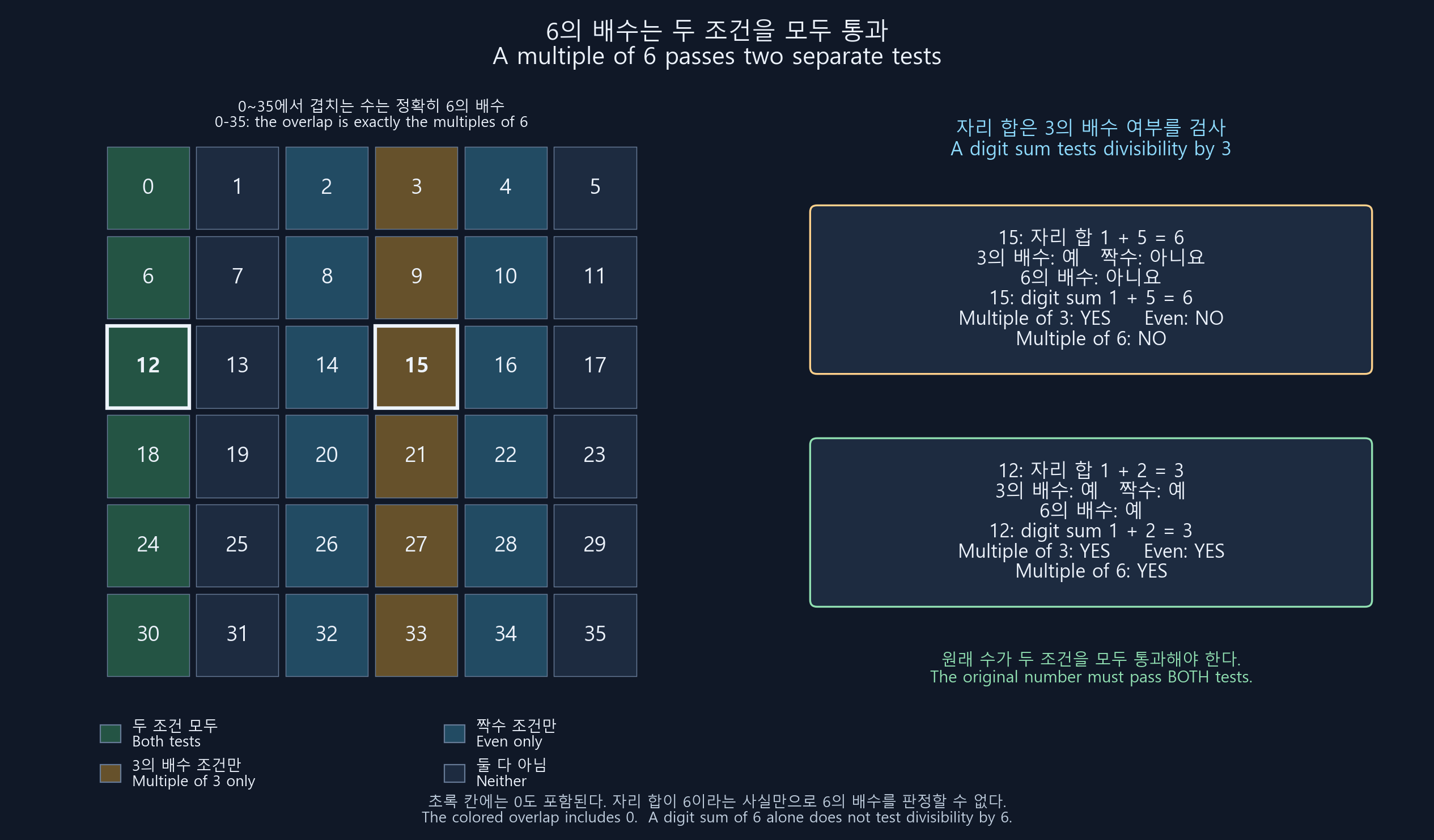
0부터 35까지를 짝수와 3의 배수 여부로 색칠한 격자. 두 조건의 교집합은 6의 배수이다. 자리 숫자의 합이 6인 15는 홀수라 탈락하고, 합이 3인 12는 짝수라 통과한다.
15는 3의 배수라는 조건만 통과하지만, 12는 두 조건을 모두 통과합니다. 0도 짝수이면서 3의 배수이므로 초록 칸에 들어갑니다. 6의 판정에서 확인하는 것은 이 두 조건의 겹치는 부분입니다.
여러 조건을 동시에 확인하는 방식은 12·14·15·18에서도 다시 사용합니다. 앞에서 익힌 규칙을 조합할 수 있으면 새로운 요령을 하나씩 외울 필요가 줄어듭니다.
4. 끝 두 자리, 세 자리, 네 자리: 4·8·16
4의 배수인지는 끝 두 자리로 만든 수를 보면 됩니다.
7316은 끝 두 자리가 16이므로 4의 배수입니다. 7318은 끝 두 자리가 18이므로 아닙니다. 앞부분 73은 이번 판정에서 더 살피지 않습니다.
이 규칙을 십의 자리의 홀짝으로 기억하는 방식도 있습니다. 정확하게 정리하면 다음과 같습니다.
| 십의 자리 숫자 | 가능한 일의 자리 숫자 | 끝 두 자리의 예 |
|---|---|---|
| 짝수 | 0, 4, 8 | 20, 24, 28, 40, 44, 48 |
| 홀수 | 2, 6 | 12, 16, 32, 36, 52, 56 |
짝수인 십의 자리 뒤에는 0도 포함됩니다. 이 자리를 빼면 20, 40, 60, 80을 놓칩니다. 두 자리 규칙과 홀짝 규칙은 서로 다른 판정법이 아니라 같은 조건을 다른 방식으로 적은 것입니다. 24에서는 십의 자리 2가 짝수이고 일의 자리 4가 허용되며, 36에서는 십의 자리 3이 홀수이고 일의 자리 6이 허용됩니다.
8의 배수는 끝 세 자리를 봅니다. 123456의 끝 세 자리는 456이고
이므로 123456은 8의 배수입니다. 반면 123454는 454가 8로 나누어떨어지지 않아 통과하지 않습니다. 끝 두 자리만 보면 부족합니다. 112와 212는 끝 두 자리가 모두 12이지만, 112는 $8\times14$이고 212는 8의 배수가 아닙니다.
| 백의 자리 숫자 | 가능한 끝 두 자리 | 끝 두 자리의 예 |
|---|---|---|
| 짝수 | 8의 배수(0 포함) | 00, 16, 32, 48, 56, 72 |
| 홀수 | 4의 홀수 배수 | 04, 12, 20, 28, 36 |
끝 세 자리의 백의 자리 숫자를 $h$, 끝 두 자리로 만든 수를 $t$라고 부르겠습니다. 이 세 자리 부분의 값은 $100h+t$입니다. 아래 두 격자는 같은 끝 두 자리 00부터 99까지를 놓고, 백의 자리가 짝수일 때와 홀수일 때 통과하는 칸을 비교합니다.
그림을 만든 Python 코드
from pathlib import Path as _bfPath
from matplotlib.font_manager import FontProperties as _bfFontProperties
from matplotlib.text import Text as _bfText
from matplotlib.ticker import Formatter as _bfFormatter
from io import BytesIO as _bfBytesIO
from IPython.display import display as _bfDisplay, Image as _bfImage

class _BilingualFormatter(_bfFormatter):
    def __init__(self, base, labels):
        self.base, self.labels = base, labels
    def set_axis(self, axis):
        super().set_axis(axis)
        self.base.set_axis(axis)
    def set_locs(self, locs):
        super().set_locs(locs)
        self.base.set_locs(locs)
    def __call__(self, value, pos=None):
        raw=self.base(value,pos)
        translated=self.labels.get(raw)
        return translated+'\n'+raw if translated else raw
    def get_offset(self):
        return self.base.get_offset()

def _apply_bilingual_figure(_bfFigure, _bfLabels, _bfOriginalPixels):
    if getattr(_bfFigure, '_bilingual_complete', False):
        return
    _bfFont = _bfPath('C:/Windows/Fonts/malgun.ttf')
    if not _bfFont.is_file():
        raise RuntimeError('Korean/English figures require the Malgun Gothic font.')
    _bfFamily = _bfFontProperties(fname=str(_bfFont)).get_name()
    # Keep the delivered original's aspect ratio.  A bilingual label must not
    # stretch the chart, its grid cells, cards or geometry vertically.
    _bfFigure.set_size_inches(_bfOriginalPixels[0] / 80,
                             _bfOriginalPixels[1] / 80, forward=True)
    _bfFigure._bilingual_original_pixels = tuple(_bfOriginalPixels)
    _bfFigure.canvas.draw()
    for _bfAxes in _bfFigure.axes:
        for _bfAxis in (_bfAxes.xaxis,_bfAxes.yaxis):
            if any(_bfTick.get_text() in _bfLabels for _bfTick in _bfAxis.get_majorticklabels()):
                _bfAxis.set_major_formatter(_BilingualFormatter(_bfAxis.get_major_formatter(),_bfLabels))
    _bfTexts = list(_bfFigure.findobj(_bfText))
    for _bfAxes in _bfFigure.axes:
        for _bfTable in _bfAxes.tables:
            _bfTexts.extend(_bfCell.get_text() for _bfCell in _bfTable.get_celld().values())
    _bfSeen = set()
    _bfChanged = []
    for _bfItem in _bfTexts:
        if id(_bfItem) in _bfSeen:
            continue
        _bfSeen.add(id(_bfItem))
        _bfOriginal = _bfItem.get_text()
        _bfKorean = _bfLabels.get(_bfOriginal)
        if _bfKorean:
            _bfItem.set_text(_bfKorean + '\n' + _bfOriginal)
            _bfItem.set_linespacing(1.05)
            _bfChanged.append((_bfKorean, _bfOriginal))
        _bfProperties = _bfItem.get_fontproperties().copy()
        _bfProperties.set_file(None)
        _bfProperties.set_family([_bfFamily, 'DejaVu Sans'])
        _bfItem.set_fontproperties(_bfProperties)
    assert _bfChanged, 'Every figure must contain meaningful Korean/English labels.'
    # Bilingual column headers must stay inside their original table cells.
    _bfFigure.canvas.draw()
    _bfRenderer = _bfFigure.canvas.get_renderer()
    for _bfAxes in _bfFigure.axes:
        for _bfTable in _bfAxes.tables:
            for _bfCell in _bfTable.get_celld().values():
                _bfCellText = _bfCell.get_text()
                _bfBox = _bfCellText.get_window_extent(_bfRenderer)
                _bfCellBox = _bfCell.get_window_extent(_bfRenderer)
                if _bfBox.width and _bfBox.height:
                    _bfFit = min(1, .92*_bfCellBox.width/_bfBox.width,
                                  .88*_bfCellBox.height/_bfBox.height)
                    _bfCellText.set_fontsize(_bfCellText.get_fontsize()*_bfFit)
        if _bfAxes.get_title():
            _bfAxes.set_title(_bfAxes.get_title(), pad=6)
    _bfFigure.canvas.draw()
    # Keep subplot headings clear of the shared two-line title, moving the
    # subplot boundary only as much as the actual rendered text requires.
    if _bfFigure._suptitle is not None:
        _bfTopTitle = _bfFigure._suptitle.get_window_extent(_bfRenderer)
        for _bfAxes in _bfFigure.axes:
            if not _bfAxes.get_title():
                continue
            _bfHeading = _bfAxes.title.get_window_extent(_bfRenderer)
            _bfGap = _bfHeading.y1 - (_bfTopTitle.y0 - 9)
            if _bfGap > 0:
                _bfPosition = _bfAxes.get_position(original=True)
                _bfAxes.set_position([_bfPosition.x0, _bfPosition.y0,
                    _bfPosition.width, _bfPosition.height - _bfGap/_bfFigure.bbox.height])
    _bfFigure._bilingual_labels = _bfChanged
    _bfFigure._bilingual_complete = True

def _display_bilingual_figure(_bfFigure):
    # A fixed full canvas avoids notebook's automatic tight crop changing the
    # aspect ratio after titles and labels become bilingual.  This is a fresh
    # Matplotlib rendering, at exactly twice the original pixel dimensions.
    global _bfDisplayedFigure
    _bfDisplayedFigure = _bfFigure
    _bfBuffer = _bfBytesIO()
    _bfFigure.savefig(_bfBuffer, format='png', dpi=160, bbox_inches=None,
                      pad_inches=0, facecolor=_bfFigure.get_facecolor())
    _bfDisplay(_bfImage(data=_bfBuffer.getvalue()))
    plt.close(_bfFigure)

_bfLabels = {'Dividend': '피제수', 'Divisor': '제수', 'Quotient': '몫', 'Remainder': '나머지', '3r mod 7': '3r의 법 7 나머지', 'then x5': '그다음 5를 곱하기', 'k, gcd(k,12)=1': '12와 서로소인 k', '5k mod 12': '5k의 법 12 나머지', 'Modulus': '법', 'Other factors': '나머지 법들의 곱', 'Inverse': '역원', 'Unit part': '단위 부품', 'Target': '목표 나머지', 'Contribution': '기여값', 'Possible square residues': '가능한 제곱 나머지', 'Squares of 0, 1, ... , m-1': '0·1·…·(m−1)의 제곱 나머지', 'PASS': '통과', 'IMPOSSIBLE': '불가능', 'mod 2': '법 2', 'mod 3': '법 3', 'mod 4': '법 4', 'mod 5': '법 5', 'mod 7': '법 7', 'mod 8': '법 8', 'mod 9': '법 9', 'mod 11': '법 11', 'mod 12': '법 12', 'mod 105': '법 105', '00 is included: 200 = 8 x 25': '00도 포함: 200 = 8 × 25', 'Ones digit of the tail': '끝 두 자리의 일의 자리', 'Tens digit of the tail': '끝 두 자리의 십의 자리', 'EVEN hundreds digit: tails 00, 08, 16, ...': '백의 자리가 짝수: 끝 두 자리 00·08·16·…', '4 x an ODD integer; not every multiple of 4': '4 × 홀수: 모든 4의 배수가 아니다', 'ODD hundreds digit: tails 04, 12, 20, ...': '백의 자리가 홀수: 끝 두 자리 04·12·20·…', '112: PASS\nHundreds: 1   Tail: 12': '112: 통과\n백의 자리: 1   끝 두 자리: 12', '116: FAIL\nHundreds: 1   Tail: 16': '116: 탈락\n백의 자리: 1   끝 두 자리: 16', '212: FAIL\nHundreds: 2   Tail: 12': '212: 탈락\n백의 자리: 2   끝 두 자리: 12', '216: PASS\nHundreds: 2   Tail: 16': '216: 통과\n백의 자리: 2   끝 두 자리: 16', 'For 8, the hundreds digit changes which two-digit tails work': '8의 판정에서는 백의 자리에 따라 가능한 끝 두 자리가 달라진다', 'The two-digit tail alone is insufficient: 112 and 212 share 12; 116 and 216 share 16.': '끝 두 자리만으로는 부족하다. 112·212는 12, 116·216은 16으로 끝난다.'}
_bfOriginalPixels = [1332, 896]

import matplotlib.pyplot as plt
from matplotlib.patches import Rectangle, FancyBboxPatch, FancyArrowPatch

BG = "#101827"
PANEL = "#1d2b40"
INK = "#edf3fc"
MUTED = "#c0cede"
BLUE = "#8fdcff"
GREEN = "#91e0b2"
GOLD = "#ffd18c"
RED = "#ffaaaa"
LINE = "#667a96"

def blank(ax):
    ax.set_facecolor(BG)
    ax.tick_params(colors=INK, labelsize=12)
    ax.set_xlim(0, 1)
    ax.set_ylim(0, 1)
    ax.axis("off")

def text(ax, x, y, value, color=INK, size=12, **kwargs):
    settings = dict(ha="center", va="center", color=color, fontsize=size,
                    transform=ax.transAxes, linespacing=1.4)
    settings.update(kwargs)
    return ax.text(x, y, value, **settings)

def card(ax, x, y, w, h, value, edge=LINE, color=INK, size=14):
    ax.add_patch(FancyBboxPatch((x, y), w, h,
                 boxstyle="round,pad=0.012", transform=ax.transAxes,
                 facecolor=PANEL, edgecolor=edge, linewidth=1.5))
    return text(ax, x+w/2, y+h/2, value, color=color, size=size)

def arrow(ax, start, end, color=BLUE):
    ax.add_patch(FancyArrowPatch(start, end, transform=ax.transAxes,
                 arrowstyle="-|>", mutation_scale=18, linewidth=1.8,
                 color=color))

def caption(fig, value):
    fig.text(.5, .035, value, ha="center", va="center",
             color=MUTED, fontsize=12, linespacing=1.4)

fig = plt.figure(figsize=(14.4, 9.2), facecolor=BG)
fig.suptitle("For 8, the hundreds digit changes which two-digit tails work",
             color=INK, fontsize=18, y=.98)
grids = [fig.add_axes([.075, .365, .37, .48]),
         fig.add_axes([.565, .365, .37, .48])]
for ax, hundreds, heading in zip(grids, [2, 1],
        ["EVEN hundreds digit: tails 00, 08, 16, ...",
         "ODD hundreds digit: tails 04, 12, 20, ..."]):
    ax.set_facecolor(BG)
    for tail in range(100):
        tens, ones = divmod(tail, 10)
        yes = (100*hundreds + tail) % 8 == 0
        ax.add_patch(Rectangle((ones-.5, tens-.5), 1, 1,
                     facecolor="#245444" if yes else PANEL,
                     edgecolor=LINE, linewidth=.6))
        if yes:
            ax.text(ones, tens, f"{tail:02d}", ha="center", va="center",
                    color=INK, fontsize=13, weight="bold" if tail == 0 else "normal")
    ax.set(xlim=(-.5, 9.5), ylim=(9.5, -.5), xticks=range(10), yticks=range(10))
    ax.tick_params(colors=INK, labelsize=12)
    for spine in ax.spines.values():
        spine.set_color(LINE)
    ax.set_xlabel("Ones digit of the tail", color=INK, fontsize=12, labelpad=7)
    ax.set_ylabel("Tens digit of the tail", color=INK, fontsize=12, labelpad=7)
    ax.set_title(heading, color=BLUE, fontsize=13, pad=17)
text(grids[0], .5, -.20, "00 is included: 200 = 8 x 25", color=GREEN, size=13)
text(grids[1], .5, -.20, "4 x an ODD integer; not every multiple of 4", color=GOLD, size=13)
ax = fig.add_axes([.045, .105, .91, .16])
blank(ax)
examples = [112, 116, 212, 216]
for x, n in zip([.015, .265, .515, .765], examples):
    hundreds, tail = divmod(n, 100)
    yes = n % 8 == 0
    card(ax, x, .12, .22, .75,
         f"{n}: {'PASS' if yes else 'FAIL'}\nHundreds: {hundreds}   Tail: {tail:02d}",
         edge=GREEN if yes else RED, color=GREEN if yes else RED, size=14)
caption(fig, "The two-digit tail alone is insufficient: 112 and 212 share 12; 116 and 216 share 16.")
for hundreds in range(10):
    for tail in range(100):
        expected = tail % 8 == (0 if hundreds % 2 == 0 else 4)
        assert ((100*hundreds+tail) % 8 == 0) == expected
assert [n % 8 == 0 for n in examples] == [True, False, False, True]
assert 200 % 8 == 0 and 100 % 8 != 0
_apply_bilingual_figure(plt.gcf(), _bfLabels, _bfOriginalPixels)
_display_bilingual_figure(plt.gcf())
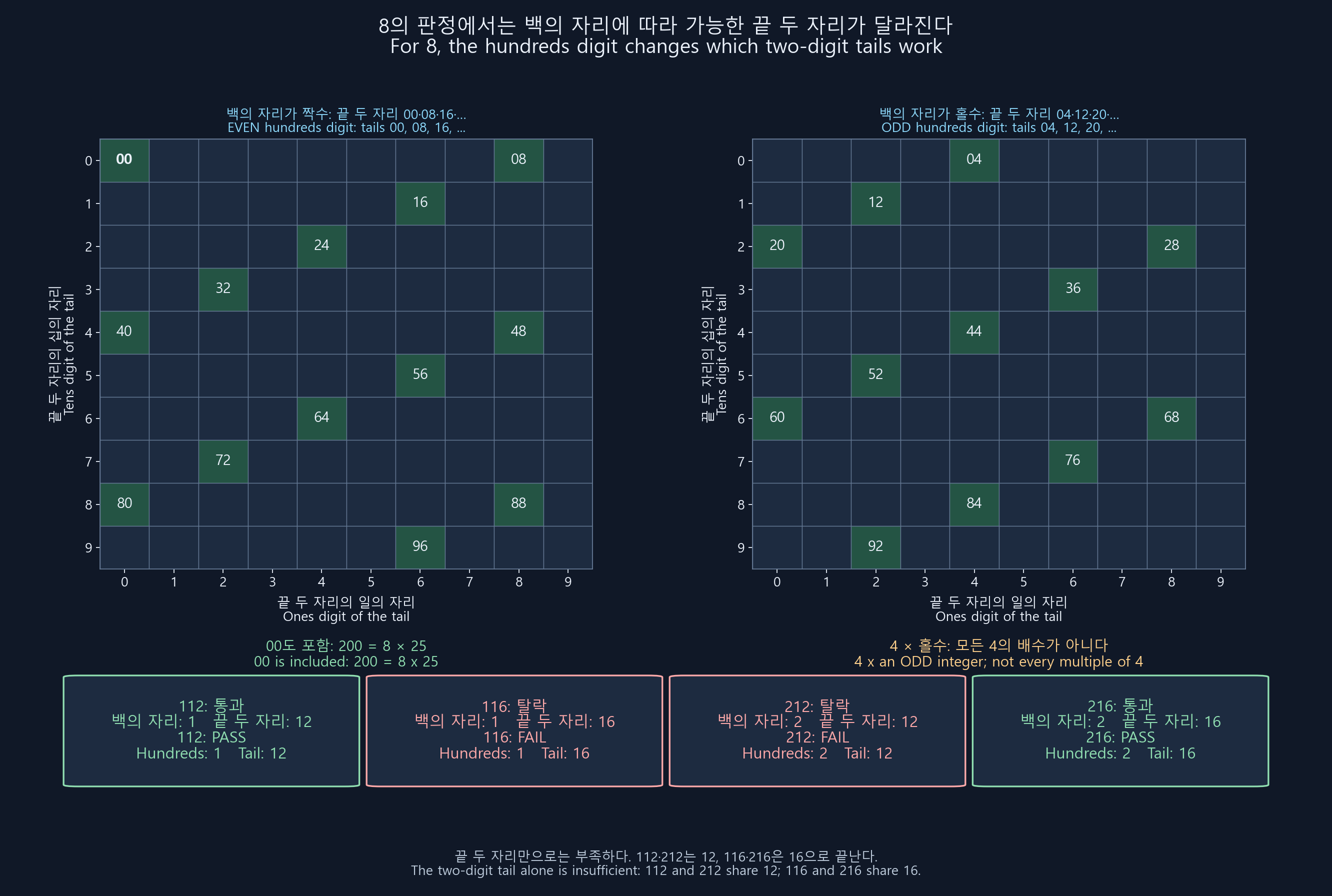
8의 배수 판정에서 백의 자리가 짝수이면 끝 두 자리는 00을 포함한 8의 배수이고, 홀수이면 4의 홀수 배수이다. 가능한 끝 두 자리를 두 격자로 비교하고 112·216은 통과, 116·212는 탈락함을 보여준다.
짝수인 백의 자리 뒤에는 00도 올 수 있어서 200은 8의 배수입니다. 홀수인 백의 자리 뒤에는 $4\times1=4$, $4\times3=12$, $4\times5=20$처럼 4에 홀수를 곱한 수가 와야 합니다. 116의 끝 두 자리 16은 4의 배수이지만 $16=4\times4$여서 이 조건을 만족하지 않습니다.
끝 두 자리를 12로 고정하고 백의 자리만 1에서 2로 바꾸어보세요. 112와 212의 판정이 달라집니다. 그다음 끝 두 자리를 16으로 바꾸면 116과 216에서 어떤 차이가 생기는지도 확인할 수 있습니다.
8의 규칙에서 백의 자리가 하는 일
백의 자리 숫자와 끝 두 자리를 따로 넣어보세요. 끝 두 자리가 4의 배수라는 사실만으로는 8의 배수인지 결정되지 않습니다.
끝 두 자리를 00과 04로 바꾸어보면 0을 포함하는 경우도 구별할 수 있습니다. 백의 자리가 0인 008은 정수 8과 같고, 000은 정수 0과 같습니다. 앞의 0은 자리를 보여주는 표시이며, 계산에서는 그 수의 값으로 판정합니다.
16의 배수는 끝 네 자리로 판정할 수 있습니다. 123456의 끝 네 자리는 3456이고
이므로 123456은 16의 배수입니다. 같은 수가 8과 16의 배수인 것은 당연합니다. 16 자체가 8의 두 배이기 때문입니다. 그러나 8의 배수라고 해서 반드시 16의 배수인 것은 아닙니다. 24가 그 간단한 예입니다.
원래 수의 자릿수가 부족하면 수 전체를 보면 됩니다. 32를 16으로 판정하면서 앞에 없는 자리를 걱정할 필요는 없습니다. 0032라고 써도 32이기 때문입니다. 1008의 끝 세 자리 008도 8과 같으므로 8의 배수로 판정합니다.
그림을 만든 Python 코드
from pathlib import Path as _bfPath
from matplotlib.font_manager import FontProperties as _bfFontProperties
from matplotlib.text import Text as _bfText
from matplotlib.ticker import Formatter as _bfFormatter
from io import BytesIO as _bfBytesIO
from IPython.display import display as _bfDisplay, Image as _bfImage

class _BilingualFormatter(_bfFormatter):
    def __init__(self, base, labels):
        self.base, self.labels = base, labels
    def set_axis(self, axis):
        super().set_axis(axis)
        self.base.set_axis(axis)
    def set_locs(self, locs):
        super().set_locs(locs)
        self.base.set_locs(locs)
    def __call__(self, value, pos=None):
        raw=self.base(value,pos)
        translated=self.labels.get(raw)
        return translated+'\n'+raw if translated else raw
    def get_offset(self):
        return self.base.get_offset()

def _apply_bilingual_figure(_bfFigure, _bfLabels, _bfOriginalPixels):
    if getattr(_bfFigure, '_bilingual_complete', False):
        return
    _bfFont = _bfPath('C:/Windows/Fonts/malgun.ttf')
    if not _bfFont.is_file():
        raise RuntimeError('Korean/English figures require the Malgun Gothic font.')
    _bfFamily = _bfFontProperties(fname=str(_bfFont)).get_name()
    # Keep the delivered original's aspect ratio.  A bilingual label must not
    # stretch the chart, its grid cells, cards or geometry vertically.
    _bfFigure.set_size_inches(_bfOriginalPixels[0] / 80,
                             _bfOriginalPixels[1] / 80, forward=True)
    _bfFigure._bilingual_original_pixels = tuple(_bfOriginalPixels)
    _bfFigure.canvas.draw()
    for _bfAxes in _bfFigure.axes:
        for _bfAxis in (_bfAxes.xaxis,_bfAxes.yaxis):
            if any(_bfTick.get_text() in _bfLabels for _bfTick in _bfAxis.get_majorticklabels()):
                _bfAxis.set_major_formatter(_BilingualFormatter(_bfAxis.get_major_formatter(),_bfLabels))
    _bfTexts = list(_bfFigure.findobj(_bfText))
    for _bfAxes in _bfFigure.axes:
        for _bfTable in _bfAxes.tables:
            _bfTexts.extend(_bfCell.get_text() for _bfCell in _bfTable.get_celld().values())
    _bfSeen = set()
    _bfChanged = []
    for _bfItem in _bfTexts:
        if id(_bfItem) in _bfSeen:
            continue
        _bfSeen.add(id(_bfItem))
        _bfOriginal = _bfItem.get_text()
        _bfKorean = _bfLabels.get(_bfOriginal)
        if _bfKorean:
            _bfItem.set_text(_bfKorean + '\n' + _bfOriginal)
            _bfItem.set_linespacing(1.05)
            _bfChanged.append((_bfKorean, _bfOriginal))
        _bfProperties = _bfItem.get_fontproperties().copy()
        _bfProperties.set_file(None)
        _bfProperties.set_family([_bfFamily, 'DejaVu Sans'])
        _bfItem.set_fontproperties(_bfProperties)
    assert _bfChanged, 'Every figure must contain meaningful Korean/English labels.'
    # Bilingual column headers must stay inside their original table cells.
    _bfFigure.canvas.draw()
    _bfRenderer = _bfFigure.canvas.get_renderer()
    for _bfAxes in _bfFigure.axes:
        for _bfTable in _bfAxes.tables:
            for _bfCell in _bfTable.get_celld().values():
                _bfCellText = _bfCell.get_text()
                _bfBox = _bfCellText.get_window_extent(_bfRenderer)
                _bfCellBox = _bfCell.get_window_extent(_bfRenderer)
                if _bfBox.width and _bfBox.height:
                    _bfFit = min(1, .92*_bfCellBox.width/_bfBox.width,
                                  .88*_bfCellBox.height/_bfBox.height)
                    _bfCellText.set_fontsize(_bfCellText.get_fontsize()*_bfFit)
        if _bfAxes.get_title():
            _bfAxes.set_title(_bfAxes.get_title(), pad=6)
    _bfFigure.canvas.draw()
    # Keep subplot headings clear of the shared two-line title, moving the
    # subplot boundary only as much as the actual rendered text requires.
    if _bfFigure._suptitle is not None:
        _bfTopTitle = _bfFigure._suptitle.get_window_extent(_bfRenderer)
        for _bfAxes in _bfFigure.axes:
            if not _bfAxes.get_title():
                continue
            _bfHeading = _bfAxes.title.get_window_extent(_bfRenderer)
            _bfGap = _bfHeading.y1 - (_bfTopTitle.y0 - 9)
            if _bfGap > 0:
                _bfPosition = _bfAxes.get_position(original=True)
                _bfAxes.set_position([_bfPosition.x0, _bfPosition.y0,
                    _bfPosition.width, _bfPosition.height - _bfGap/_bfFigure.bbox.height])
    _bfFigure._bilingual_labels = _bfChanged
    _bfFigure._bilingual_complete = True

def _display_bilingual_figure(_bfFigure):
    # A fixed full canvas avoids notebook's automatic tight crop changing the
    # aspect ratio after titles and labels become bilingual.  This is a fresh
    # Matplotlib rendering, at exactly twice the original pixel dimensions.
    global _bfDisplayedFigure
    _bfDisplayedFigure = _bfFigure
    _bfBuffer = _bfBytesIO()
    _bfFigure.savefig(_bfBuffer, format='png', dpi=160, bbox_inches=None,
                      pad_inches=0, facecolor=_bfFigure.get_facecolor())
    _bfDisplay(_bfImage(data=_bfBuffer.getvalue()))
    plt.close(_bfFigure)

_bfLabels = {'Dividend': '피제수', 'Divisor': '제수', 'Quotient': '몫', 'Remainder': '나머지', '3r mod 7': '3r의 법 7 나머지', 'then x5': '그다음 5를 곱하기', 'k, gcd(k,12)=1': '12와 서로소인 k', '5k mod 12': '5k의 법 12 나머지', 'Modulus': '법', 'Other factors': '나머지 법들의 곱', 'Inverse': '역원', 'Unit part': '단위 부품', 'Target': '목표 나머지', 'Contribution': '기여값', 'Possible square residues': '가능한 제곱 나머지', 'Squares of 0, 1, ... , m-1': '0·1·…·(m−1)의 제곱 나머지', 'PASS': '통과', 'IMPOSSIBLE': '불가능', 'mod 2': '법 2', 'mod 3': '법 3', 'mod 4': '법 4', 'mod 5': '법 5', 'mod 7': '법 7', 'mod 8': '법 8', 'mod 9': '법 9', 'mod 11': '법 11', 'mod 12': '법 12', 'mod 105': '법 105', 'Ones digit': '일의 자리', 'Tens digit': '십의 자리', 'Multiples of 4 among 00-99': '00~99에서 4의 배수', 'Check the last 2 digits': '끝 두 자리를 확인', 'Check the last 3 digits': '끝 세 자리를 확인', 'Check the last 4 digits': '끝 네 자리를 확인', 'The final digits contain all the information needed': '판정에 필요한 정보는 끝자리에 담겨 있다'}
_bfOriginalPixels = [1150, 562]

import matplotlib.pyplot as plt
from matplotlib.patches import Rectangle

fig, axes = plt.subplots(1, 2, figsize=(12, 5.8), facecolor="#0d1117")
for ax in axes:
    ax.set_facecolor("#0d1117")
    ax.tick_params(colors="#e6edf3")
    for spine in ax.spines.values(): spine.set_color("#738399")
ax = axes[0]
for tens in range(10):
    for ones in range(10):
        yes = (10*tens + ones) % 4 == 0
        ax.add_patch(Rectangle((ones-.5,tens-.5),1,1,facecolor="#216052" if yes else "#1c2534",edgecolor="#526276",linewidth=.4))
        if yes: ax.text(ones,tens,f"{10*tens+ones:02d}",ha="center",va="center",color="#e6edf3",fontsize=10)
ax.set(xlim=(-.5,9.5),ylim=(9.5,-.5),xticks=range(10),yticks=range(10),xlabel="Ones digit",ylabel="Tens digit")
ax.xaxis.label.set_color("#e6edf3"); ax.yaxis.label.set_color("#e6edf3")
ax.set_title("Multiples of 4 among 00-99",color="#e6edf3")
ax = axes[1]; ax.axis("off")
lines=[("4", "Check the last 2 digits", "100 = 4 x 25"), ("8", "Check the last 3 digits", "1000 = 8 x 125"), ("16", "Check the last 4 digits", "10000 = 16 x 625")]
for y,(n,rule,reason) in zip([.79,.49,.19],lines):
    ax.text(.04,y,n,color="#93e5ff",fontsize=26,weight="bold",transform=ax.transAxes)
    ax.text(.22,y+.03,rule,color="#e6edf3",fontsize=13,transform=ax.transAxes)
    ax.text(.22,y-.08,reason,color="#bdc7d5",fontsize=12,transform=ax.transAxes)
fig.suptitle("The final digits contain all the information needed",color="#e6edf3",fontsize=17)
fig.subplots_adjust(left=.07,right=.98,top=.87,bottom=.12,wspace=.28)
_apply_bilingual_figure(plt.gcf(), _bfLabels, _bfOriginalPixels)
_display_bilingual_figure(plt.gcf())
assert all(((10*t+u)%4==0)==(u in ([0,4,8] if t%2==0 else [2,6])) for t in range(10) for u in range(10))
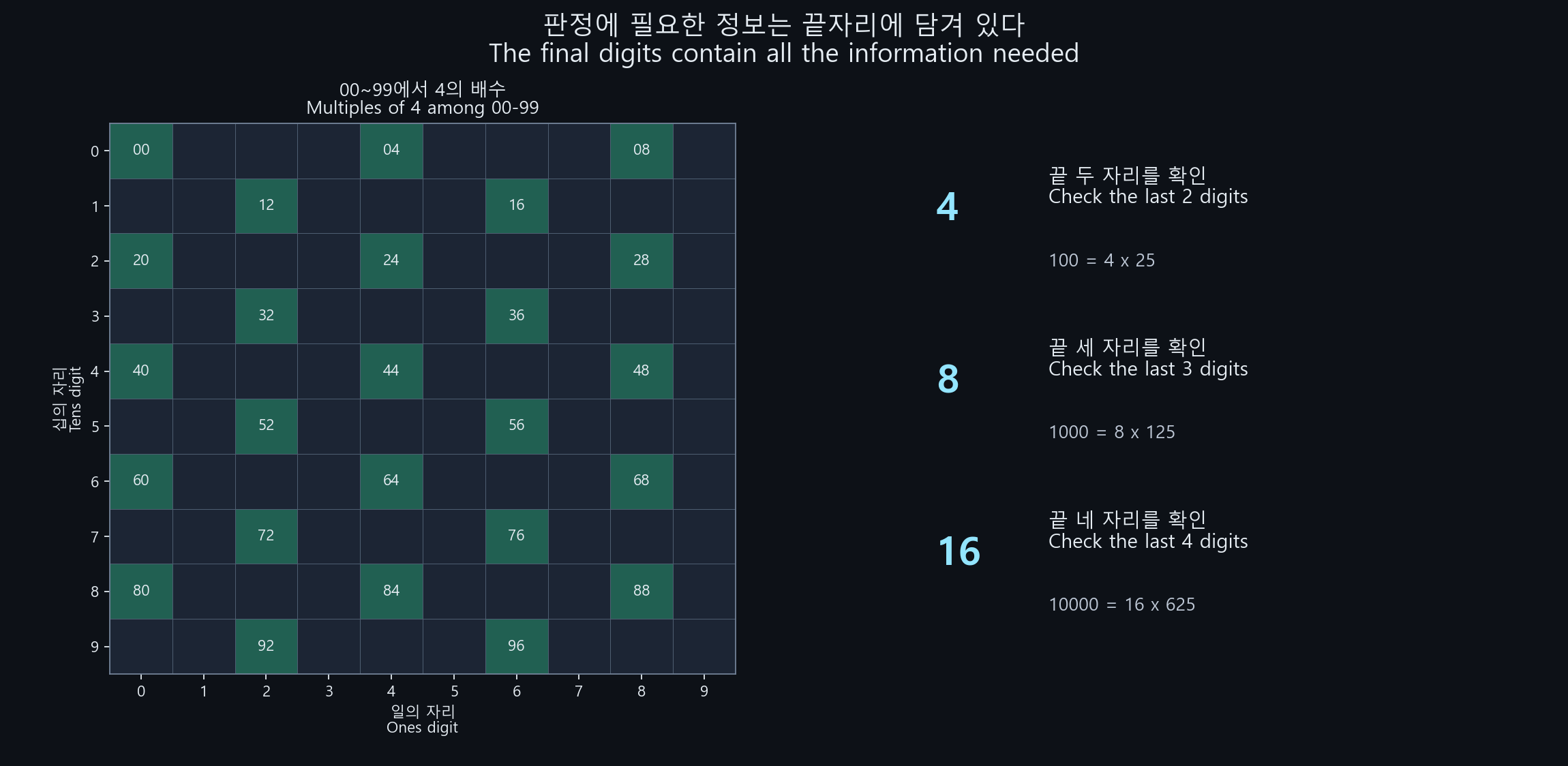
4의 배수를 끝 두 자리의 십의 자리와 일의 자리로 배열한 표. 짝수 십의 자리에는 0·4·8, 홀수 십의 자리에는 2·6이 대응한다.
4에서 두 자리, 8에서 세 자리, 16에서 네 자리라는 배열을 보면 100·1000·10000과 관계가 있을 것이라는 생각이 듭니다. 실제로 그 직관이 맞습니다. 다음 편에서 “앞부분을 버려도 되는 이유”를 정확한 식으로 확인하겠습니다.
5. 앞부분과 끝자리를 나누어 7을 검사하기
이제 수를 두 조각으로 나누겠습니다. 203에서는 일의 자리가 3이고, 그 앞부분은 20입니다. 앞부분을 $a$, 일의 자리 숫자를 $b$라고 쓰면
203에서는 $a=20$, $b=3$입니다. 12345에서는 $a=1234$, $b=5$입니다. $a$는 일의 자리를 뺀 앞부분 전체입니다. 십의 자리 숫자 하나를 뜻하지 않습니다.
7의 배수 판정은 앞부분에서 일의 자리의 두 배를 빼는 것입니다.
새로 얻은 수를 $T$라고 부르겠습니다. $T$가 7의 배수이면 원래 수 $N$도 7의 배수이고, $T$가 7의 배수가 아니면 $N$도 아닙니다. 여기서 바꾸는 것은 숫자이고, 유지하려는 것은 배수인지 아닌지라는 답입니다.
203을 바꾸면
입니다. 14가 7의 배수이므로 203도 통과합니다. 204는 $20-2\times4=12$가 되어 통과하지 않습니다. 계산 과정이 짧고, 결과를 구구단으로 알아볼 수 있는 곳에서 끝납니다.
1071처럼 길면 한 번 더 적용해도 됩니다.
처음 정의했듯이 0은 7의 배수입니다. 따라서 105도, 1071도 7의 배수입니다. “0이 나왔으니 판정하지 못했다”가 아니라, 배수라는 판정을 얻은 것입니다.
49에서는 $4-2\times9=-14$가 됩니다. $-14=7\times(-2)$이므로 역시 통과합니다. 계산 결과를 항상 양의 수로 만들려고 순서를 뒤집거나 규칙을 바꿀 필요는 없습니다. 음수가 나오면 그대로 배수인지 보거나, 부호를 떼고 14를 검사하면 됩니다.
6. 11의 교대합과 13·17·19의 끝자리 규칙
11은 일의 자리부터 번갈아 더하고 뺍니다. 2728이라면 일의 자리 8부터 시작해서
입니다. 결과 11이 11의 배수이므로 2728은 11의 배수입니다. 121이라면 $1-2+1=0$이므로 역시 통과합니다.
“결과가 0일 때만 된다”라고 좁혀 기억하지 마세요. 0, 11, $-11$, 22처럼 11의 배수이면 됩니다. 209에서는 $9-0+2=11$입니다. 중간에 0이 있어도 그 자리를 건너뛰어 부호의 순서를 바꾸지 않습니다. 0도 하나의 자리입니다.
왼쪽에서 시작해도 배수 판정은 같습니다. 2728을 왼쪽부터 계산하면 $2-7+2-8=-11$입니다. 오른쪽에서 얻은 11과 부호만 다르고, 둘 다 11의 배수입니다. 자릿수가 홀수이면 두 계산은 같고 짝수이면 전체 부호가 반대가 됩니다. 한 칸 건너 숫자들을 모아 $(2+2)-(7+8)$로 계산하는 표현도 같은 규칙입니다.
계산 방향과 자리마다 붙는 부호를 그림으로 맞춰보겠습니다. 결과가 0인 경우와 0이 아닌 경우를 나란히 놓고, 숫자가 0인 자리도 칸을 그대로 남겼습니다.
그림을 만든 Python 코드
from pathlib import Path as _bfPath
from matplotlib.font_manager import FontProperties as _bfFontProperties
from matplotlib.text import Text as _bfText
from matplotlib.ticker import Formatter as _bfFormatter
from io import BytesIO as _bfBytesIO
from IPython.display import display as _bfDisplay, Image as _bfImage

class _BilingualFormatter(_bfFormatter):
    def __init__(self, base, labels):
        self.base, self.labels = base, labels
    def set_axis(self, axis):
        super().set_axis(axis)
        self.base.set_axis(axis)
    def set_locs(self, locs):
        super().set_locs(locs)
        self.base.set_locs(locs)
    def __call__(self, value, pos=None):
        raw=self.base(value,pos)
        translated=self.labels.get(raw)
        return translated+'\n'+raw if translated else raw
    def get_offset(self):
        return self.base.get_offset()

def _apply_bilingual_figure(_bfFigure, _bfLabels, _bfOriginalPixels):
    if getattr(_bfFigure, '_bilingual_complete', False):
        return
    _bfFont = _bfPath('C:/Windows/Fonts/malgun.ttf')
    if not _bfFont.is_file():
        raise RuntimeError('Korean/English figures require the Malgun Gothic font.')
    _bfFamily = _bfFontProperties(fname=str(_bfFont)).get_name()
    # Keep the delivered original's aspect ratio.  A bilingual label must not
    # stretch the chart, its grid cells, cards or geometry vertically.
    _bfFigure.set_size_inches(_bfOriginalPixels[0] / 80,
                             _bfOriginalPixels[1] / 80, forward=True)
    _bfFigure._bilingual_original_pixels = tuple(_bfOriginalPixels)
    _bfFigure.canvas.draw()
    for _bfAxes in _bfFigure.axes:
        for _bfAxis in (_bfAxes.xaxis,_bfAxes.yaxis):
            if any(_bfTick.get_text() in _bfLabels for _bfTick in _bfAxis.get_majorticklabels()):
                _bfAxis.set_major_formatter(_BilingualFormatter(_bfAxis.get_major_formatter(),_bfLabels))
    _bfTexts = list(_bfFigure.findobj(_bfText))
    for _bfAxes in _bfFigure.axes:
        for _bfTable in _bfAxes.tables:
            _bfTexts.extend(_bfCell.get_text() for _bfCell in _bfTable.get_celld().values())
    _bfSeen = set()
    _bfChanged = []
    for _bfItem in _bfTexts:
        if id(_bfItem) in _bfSeen:
            continue
        _bfSeen.add(id(_bfItem))
        _bfOriginal = _bfItem.get_text()
        _bfKorean = _bfLabels.get(_bfOriginal)
        if _bfKorean:
            _bfItem.set_text(_bfKorean + '\n' + _bfOriginal)
            _bfItem.set_linespacing(1.05)
            _bfChanged.append((_bfKorean, _bfOriginal))
        _bfProperties = _bfItem.get_fontproperties().copy()
        _bfProperties.set_file(None)
        _bfProperties.set_family([_bfFamily, 'DejaVu Sans'])
        _bfItem.set_fontproperties(_bfProperties)
    assert _bfChanged, 'Every figure must contain meaningful Korean/English labels.'
    # Bilingual column headers must stay inside their original table cells.
    _bfFigure.canvas.draw()
    _bfRenderer = _bfFigure.canvas.get_renderer()
    for _bfAxes in _bfFigure.axes:
        for _bfTable in _bfAxes.tables:
            for _bfCell in _bfTable.get_celld().values():
                _bfCellText = _bfCell.get_text()
                _bfBox = _bfCellText.get_window_extent(_bfRenderer)
                _bfCellBox = _bfCell.get_window_extent(_bfRenderer)
                if _bfBox.width and _bfBox.height:
                    _bfFit = min(1, .92*_bfCellBox.width/_bfBox.width,
                                  .88*_bfCellBox.height/_bfBox.height)
                    _bfCellText.set_fontsize(_bfCellText.get_fontsize()*_bfFit)
        if _bfAxes.get_title():
            _bfAxes.set_title(_bfAxes.get_title(), pad=6)
    _bfFigure.canvas.draw()
    # Keep subplot headings clear of the shared two-line title, moving the
    # subplot boundary only as much as the actual rendered text requires.
    if _bfFigure._suptitle is not None:
        _bfTopTitle = _bfFigure._suptitle.get_window_extent(_bfRenderer)
        for _bfAxes in _bfFigure.axes:
            if not _bfAxes.get_title():
                continue
            _bfHeading = _bfAxes.title.get_window_extent(_bfRenderer)
            _bfGap = _bfHeading.y1 - (_bfTopTitle.y0 - 9)
            if _bfGap > 0:
                _bfPosition = _bfAxes.get_position(original=True)
                _bfAxes.set_position([_bfPosition.x0, _bfPosition.y0,
                    _bfPosition.width, _bfPosition.height - _bfGap/_bfFigure.bbox.height])
    _bfFigure._bilingual_labels = _bfChanged
    _bfFigure._bilingual_complete = True

def _display_bilingual_figure(_bfFigure):
    # A fixed full canvas avoids notebook's automatic tight crop changing the
    # aspect ratio after titles and labels become bilingual.  This is a fresh
    # Matplotlib rendering, at exactly twice the original pixel dimensions.
    global _bfDisplayedFigure
    _bfDisplayedFigure = _bfFigure
    _bfBuffer = _bfBytesIO()
    _bfFigure.savefig(_bfBuffer, format='png', dpi=160, bbox_inches=None,
                      pad_inches=0, facecolor=_bfFigure.get_facecolor())
    _bfDisplay(_bfImage(data=_bfBuffer.getvalue()))
    plt.close(_bfFigure)

_bfLabels = {'Dividend': '피제수', 'Divisor': '제수', 'Quotient': '몫', 'Remainder': '나머지', '3r mod 7': '3r의 법 7 나머지', 'then x5': '그다음 5를 곱하기', 'k, gcd(k,12)=1': '12와 서로소인 k', '5k mod 12': '5k의 법 12 나머지', 'Modulus': '법', 'Other factors': '나머지 법들의 곱', 'Inverse': '역원', 'Unit part': '단위 부품', 'Target': '목표 나머지', 'Contribution': '기여값', 'Possible square residues': '가능한 제곱 나머지', 'Squares of 0, 1, ... , m-1': '0·1·…·(m−1)의 제곱 나머지', 'PASS': '통과', 'IMPOSSIBLE': '불가능', 'mod 2': '법 2', 'mod 3': '법 3', 'mod 4': '법 4', 'mod 5': '법 5', 'mod 7': '법 7', 'mod 8': '법 8', 'mod 9': '법 9', 'mod 11': '법 11', 'mod 12': '법 12', 'mod 105': '법 105', '2728: either direction works': '2728: 어느 방향으로 시작해도 된다', 'From the right: 8 - 2 + 7 - 2 = 11': '오른쪽부터: 8 − 2 + 7 − 2 = 11', 'From the left: 2 - 7 + 2 - 8 = -11': '왼쪽부터: 2 − 7 + 2 − 8 = −11', 'Four digits: only the overall sign changes.': '네 자리: 전체 부호만 바뀐다.', '121: a zero result passes': '121: 결과가 0이어도 통과', 'Zero is a multiple of 11.': '0도 11의 배수이다.', 'Three digits: both directions give the same sum.': '세 자리: 양쪽 방향의 합이 같다.', '209: keep the middle place': '209: 가운데 자리를 유지', 'WRONG: delete the zero\n29 gives 9 - 2 = 7': '잘못된 계산: 0인 자리를 삭제\n29의 교대합은 9 − 2 = 7', 'Removing a place changes later signs.': '한 자리를 없애면 뒤의 부호가 바뀐다.', 'Alternating signs belong to digit positions, including a zero': '교대 부호는 자리에 붙는다. 0인 자리도 포함한다', '11, -11, and 0 all pass the same divisibility test.  A zero digit still occupies one position.': '11·−11·0은 모두 통과한다. 숫자 0도 한 자리를 차지한다.'}
_bfOriginalPixels = [1442, 779]

import matplotlib.pyplot as plt
from matplotlib.patches import Rectangle, FancyBboxPatch, FancyArrowPatch

BG = "#101827"
PANEL = "#1d2b40"
INK = "#edf3fc"
MUTED = "#c0cede"
BLUE = "#8fdcff"
GREEN = "#91e0b2"
GOLD = "#ffd18c"
RED = "#ffaaaa"
LINE = "#667a96"

def blank(ax):
    ax.set_facecolor(BG)
    ax.tick_params(colors=INK, labelsize=12)
    ax.set_xlim(0, 1)
    ax.set_ylim(0, 1)
    ax.axis("off")

def text(ax, x, y, value, color=INK, size=12, **kwargs):
    settings = dict(ha="center", va="center", color=color, fontsize=size,
                    transform=ax.transAxes, linespacing=1.4)
    settings.update(kwargs)
    return ax.text(x, y, value, **settings)

def card(ax, x, y, w, h, value, edge=LINE, color=INK, size=14):
    ax.add_patch(FancyBboxPatch((x, y), w, h,
                 boxstyle="round,pad=0.012", transform=ax.transAxes,
                 facecolor=PANEL, edgecolor=edge, linewidth=1.5))
    return text(ax, x+w/2, y+h/2, value, color=color, size=size)

def arrow(ax, start, end, color=BLUE):
    ax.add_patch(FancyArrowPatch(start, end, transform=ax.transAxes,
                 arrowstyle="-|>", mutation_scale=18, linewidth=1.8,
                 color=color))

def caption(fig, value):
    fig.text(.5, .035, value, ha="center", va="center",
             color=MUTED, fontsize=12, linespacing=1.4)

fig, axes = plt.subplots(1, 3, figsize=(15.3, 8), facecolor=BG)
fig.suptitle("Alternating signs belong to digit positions, including a zero",
             color=INK, fontsize=19, y=.975)
fig.subplots_adjust(left=.035, right=.965, top=.85, bottom=.13, wspace=.19)
for ax in axes:
    blank(ax)

def digit_strip(ax, digits, signs, y, zero_emphasis=False):
    width, gap = .16, .055
    start = (.98 - (len(digits)*width+(len(digits)-1)*gap))/2
    for i, (digit, sign) in enumerate(zip(digits, signs)):
        x = start+i*(width+gap)
        edge = GOLD if zero_emphasis and digit == "0" else LINE
        card(ax, x, y, width, .13, digit, edge=edge, size=22)
        text(ax, x+width/2, y+.19, sign,
             color=BLUE if sign == "+" else GOLD, size=19)

ax = axes[0]
text(ax, .5, 1.0, "2728: either direction works", color=BLUE, size=15)
digit_strip(ax, "2728", ["-", "+", "-", "+"], .64)
arrow(ax, (.85, .90), (.15, .90))
text(ax, .5, .55, "From the right: 8 - 2 + 7 - 2 = 11", size=12)
digit_strip(ax, "2728", ["+", "-", "+", "-"], .23)
arrow(ax, (.15, .49), (.85, .49))
text(ax, .5, .13, "From the left: 2 - 7 + 2 - 8 = -11", size=12)
text(ax, .5, .025, "Four digits: only the overall sign changes.", color=MUTED, size=12)

ax = axes[1]
text(ax, .5, 1.0, "121: a zero result passes", color=BLUE, size=15)
digit_strip(ax, "121", ["+", "-", "+"], .64)
arrow(ax, (.80, .90), (.20, .90))
text(ax, .5, .53, "1 - 2 + 1 = 0", size=17)
card(ax, .14, .28, .72, .14, "0 = 11 x 0", edge=GREEN, color=GREEN, size=19)
text(ax, .5, .14, "Zero is a multiple of 11.", color=GREEN, size=13)
text(ax, .5, .025, "Three digits: both directions give the same sum.", color=MUTED, size=12)

ax = axes[2]
text(ax, .5, 1.0, "209: keep the middle place", color=BLUE, size=15)
digit_strip(ax, "209", ["+", "-", "+"], .64, zero_emphasis=True)
arrow(ax, (.80, .90), (.20, .90))
text(ax, .5, .53, "9 - 0 + 2 = 11", color=GREEN, size=17)
card(ax, .08, .23, .84, .17,
     "WRONG: delete the zero\n29 gives 9 - 2 = 7", edge=RED, color=RED, size=13)
text(ax, .5, .095, "Removing a place changes later signs.", color=GOLD, size=12)
caption(fig, "11, -11, and 0 all pass the same divisibility test.  A zero digit still occupies one position.")

def alternating(n, from_right=True):
    digits = list(str(n))
    if from_right:
        digits.reverse()
    return sum((1 if i % 2 == 0 else -1)*int(d) for i, d in enumerate(digits))

assert [(alternating(n), alternating(n, False)) for n in [2728, 121, 209]] == [(11, -11), (0, 0), (11, 11)]
assert alternating(29) == 7
for n in range(10000):
    right, left = alternating(n), alternating(n, False)
    assert left == (-1)**(len(str(n))-1)*right
    assert (n % 11 == 0) == (right % 11 == 0)
_apply_bilingual_figure(plt.gcf(), _bfLabels, _bfOriginalPixels)
_display_bilingual_figure(plt.gcf())
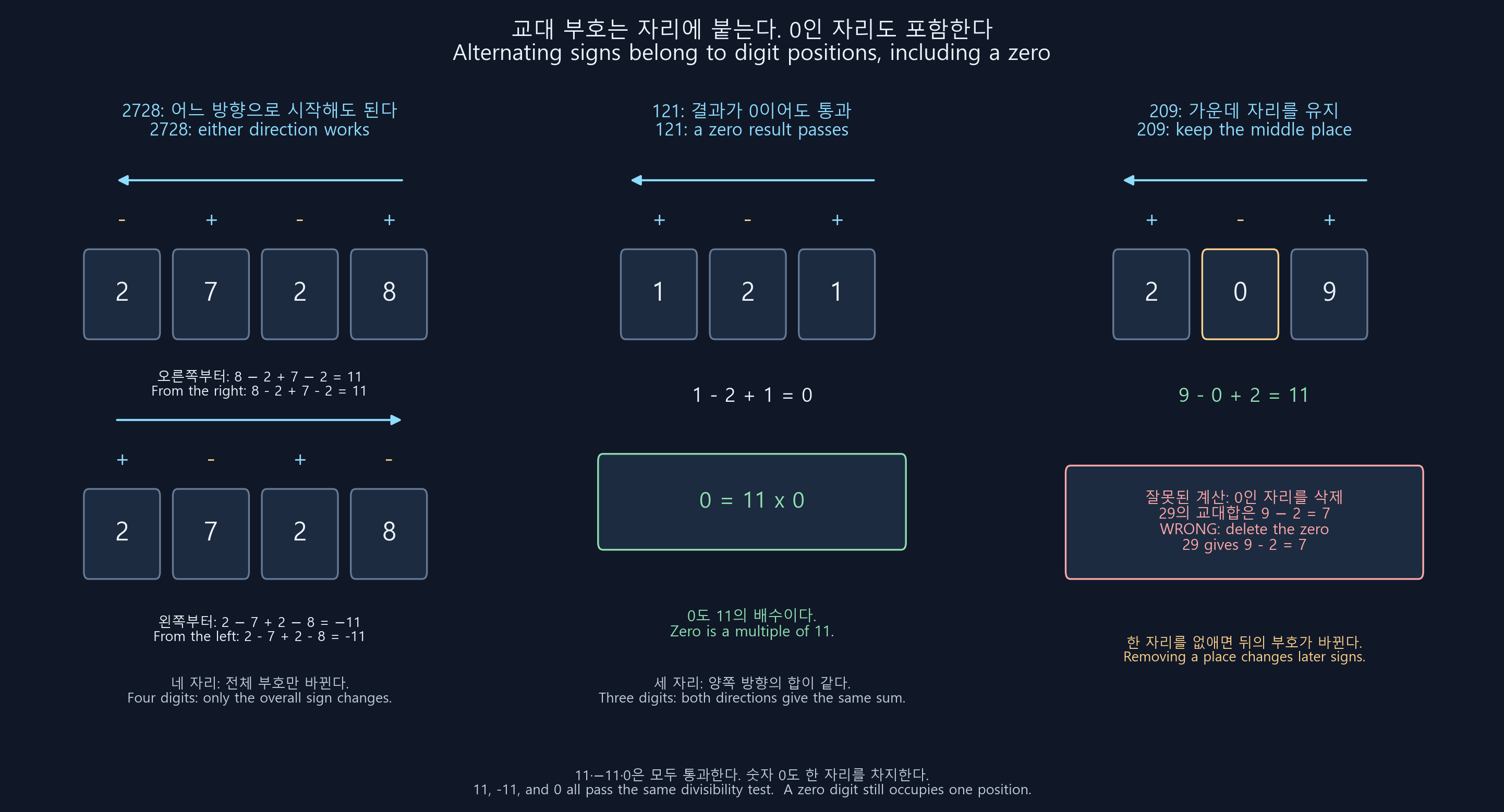
2728을 오른쪽부터 계산하면 11, 왼쪽부터 계산하면 음의 11이며 둘 다 통과한다. 121의 교대합은 0이다. 209의 0 자리를 유지하면 9−0+2=11이지만 그 자리를 삭제하면 부호 배열이 바뀌어 잘못된 결과가 나온다.
209에서 가운데 0을 지우고 $9-2=7$로 계산하면 원래 수가 아닌 29를 검사하게 됩니다. 자리를 유지하면서 부호를 번갈아 붙인 뒤, 그 결과가 0을 포함한 11의 배수인지 확인해야 합니다.
13·17·19에서는 7과 같은 방식으로 앞부분 $a$와 끝자리 $b$를 나눕니다. 곱하는 수와 더하기·빼기만 달라집니다.
| 검사할 수 | 새로 검사할 수 | 실제 예 |
|---|---|---|
| 7 | $a-2b$ | $203\to20-6=14$ |
| 13 | $a+4b$ | $286\to28+24=52$ |
| 17 | $a-5b$ | $221\to22-5=17$ |
| 19 | $a+2b$ | $361\to36+2=38$ |
13에서는 일의 자리의 네 배를 더합니다. 286은 52가 되고, $52=13\times4$이므로 통과합니다. 287은 $28+4\times7=56$이므로 13의 배수가 아닙니다. 52가 잘 떠오르지 않으면 다시 $5+4\times2=13$으로 줄여도 됩니다.
17에서는 일의 자리의 다섯 배를 뺍니다. 697은 $69-5\times7=34$가 됩니다. 34가 17의 두 배라는 것을 알면 여기서 끝입니다. 한 번 더 적용하면 $3-5\times4=-17$이며 결론은 같습니다.
19에서는 일의 자리의 두 배를 더합니다. 361은 $36+2\times1=38$이므로 19의 배수입니다. 362는 $36+2\times2=40$이므로 아닙니다. 같은 “두 배”를 쓰더라도 7에서는 빼고 19에서는 더한다는 차이를 기억해야 합니다.
그림을 만든 Python 코드
from pathlib import Path as _bfPath
from matplotlib.font_manager import FontProperties as _bfFontProperties
from matplotlib.text import Text as _bfText
from matplotlib.ticker import Formatter as _bfFormatter
from io import BytesIO as _bfBytesIO
from IPython.display import display as _bfDisplay, Image as _bfImage

class _BilingualFormatter(_bfFormatter):
    def __init__(self, base, labels):
        self.base, self.labels = base, labels
    def set_axis(self, axis):
        super().set_axis(axis)
        self.base.set_axis(axis)
    def set_locs(self, locs):
        super().set_locs(locs)
        self.base.set_locs(locs)
    def __call__(self, value, pos=None):
        raw=self.base(value,pos)
        translated=self.labels.get(raw)
        return translated+'\n'+raw if translated else raw
    def get_offset(self):
        return self.base.get_offset()

def _apply_bilingual_figure(_bfFigure, _bfLabels, _bfOriginalPixels):
    if getattr(_bfFigure, '_bilingual_complete', False):
        return
    _bfFont = _bfPath('C:/Windows/Fonts/malgun.ttf')
    if not _bfFont.is_file():
        raise RuntimeError('Korean/English figures require the Malgun Gothic font.')
    _bfFamily = _bfFontProperties(fname=str(_bfFont)).get_name()
    # Keep the delivered original's aspect ratio.  A bilingual label must not
    # stretch the chart, its grid cells, cards or geometry vertically.
    _bfFigure.set_size_inches(_bfOriginalPixels[0] / 80,
                             _bfOriginalPixels[1] / 80, forward=True)
    _bfFigure._bilingual_original_pixels = tuple(_bfOriginalPixels)
    _bfFigure.canvas.draw()
    for _bfAxes in _bfFigure.axes:
        for _bfAxis in (_bfAxes.xaxis,_bfAxes.yaxis):
            if any(_bfTick.get_text() in _bfLabels for _bfTick in _bfAxis.get_majorticklabels()):
                _bfAxis.set_major_formatter(_BilingualFormatter(_bfAxis.get_major_formatter(),_bfLabels))
    _bfTexts = list(_bfFigure.findobj(_bfText))
    for _bfAxes in _bfFigure.axes:
        for _bfTable in _bfAxes.tables:
            _bfTexts.extend(_bfCell.get_text() for _bfCell in _bfTable.get_celld().values())
    _bfSeen = set()
    _bfChanged = []
    for _bfItem in _bfTexts:
        if id(_bfItem) in _bfSeen:
            continue
        _bfSeen.add(id(_bfItem))
        _bfOriginal = _bfItem.get_text()
        _bfKorean = _bfLabels.get(_bfOriginal)
        if _bfKorean:
            _bfItem.set_text(_bfKorean + '\n' + _bfOriginal)
            _bfItem.set_linespacing(1.05)
            _bfChanged.append((_bfKorean, _bfOriginal))
        _bfProperties = _bfItem.get_fontproperties().copy()
        _bfProperties.set_file(None)
        _bfProperties.set_family([_bfFamily, 'DejaVu Sans'])
        _bfItem.set_fontproperties(_bfProperties)
    assert _bfChanged, 'Every figure must contain meaningful Korean/English labels.'
    # Bilingual column headers must stay inside their original table cells.
    _bfFigure.canvas.draw()
    _bfRenderer = _bfFigure.canvas.get_renderer()
    for _bfAxes in _bfFigure.axes:
        for _bfTable in _bfAxes.tables:
            for _bfCell in _bfTable.get_celld().values():
                _bfCellText = _bfCell.get_text()
                _bfBox = _bfCellText.get_window_extent(_bfRenderer)
                _bfCellBox = _bfCell.get_window_extent(_bfRenderer)
                if _bfBox.width and _bfBox.height:
                    _bfFit = min(1, .92*_bfCellBox.width/_bfBox.width,
                                  .88*_bfCellBox.height/_bfBox.height)
                    _bfCellText.set_fontsize(_bfCellText.get_fontsize()*_bfFit)
        if _bfAxes.get_title():
            _bfAxes.set_title(_bfAxes.get_title(), pad=6)
    _bfFigure.canvas.draw()
    # Keep subplot headings clear of the shared two-line title, moving the
    # subplot boundary only as much as the actual rendered text requires.
    if _bfFigure._suptitle is not None:
        _bfTopTitle = _bfFigure._suptitle.get_window_extent(_bfRenderer)
        for _bfAxes in _bfFigure.axes:
            if not _bfAxes.get_title():
                continue
            _bfHeading = _bfAxes.title.get_window_extent(_bfRenderer)
            _bfGap = _bfHeading.y1 - (_bfTopTitle.y0 - 9)
            if _bfGap > 0:
                _bfPosition = _bfAxes.get_position(original=True)
                _bfAxes.set_position([_bfPosition.x0, _bfPosition.y0,
                    _bfPosition.width, _bfPosition.height - _bfGap/_bfFigure.bbox.height])
    _bfFigure._bilingual_labels = _bfChanged
    _bfFigure._bilingual_complete = True

def _display_bilingual_figure(_bfFigure):
    # A fixed full canvas avoids notebook's automatic tight crop changing the
    # aspect ratio after titles and labels become bilingual.  This is a fresh
    # Matplotlib rendering, at exactly twice the original pixel dimensions.
    global _bfDisplayedFigure
    _bfDisplayedFigure = _bfFigure
    _bfBuffer = _bfBytesIO()
    _bfFigure.savefig(_bfBuffer, format='png', dpi=160, bbox_inches=None,
                      pad_inches=0, facecolor=_bfFigure.get_facecolor())
    _bfDisplay(_bfImage(data=_bfBuffer.getvalue()))
    plt.close(_bfFigure)

_bfLabels = {'Dividend': '피제수', 'Divisor': '제수', 'Quotient': '몫', 'Remainder': '나머지', '3r mod 7': '3r의 법 7 나머지', 'then x5': '그다음 5를 곱하기', 'k, gcd(k,12)=1': '12와 서로소인 k', '5k mod 12': '5k의 법 12 나머지', 'Modulus': '법', 'Other factors': '나머지 법들의 곱', 'Inverse': '역원', 'Unit part': '단위 부품', 'Target': '목표 나머지', 'Contribution': '기여값', 'Possible square residues': '가능한 제곱 나머지', 'Squares of 0, 1, ... , m-1': '0·1·…·(m−1)의 제곱 나머지', 'PASS': '통과', 'IMPOSSIBLE': '불가능', 'mod 2': '법 2', 'mod 3': '법 3', 'mod 4': '법 4', 'mod 5': '법 5', 'mod 7': '법 7', 'mod 8': '법 8', 'mod 9': '법 9', 'mod 11': '법 11', 'mod 12': '법 12', 'mod 105': '법 105', 'Zero, positive, or negative: divisibility is preserved': '0·양수·음수 모두 배수 여부를 보존한다'}
_bfOriginalPixels = [1213, 634]

import matplotlib.pyplot as plt
from matplotlib.patches import FancyBboxPatch, FancyArrowPatch

paths = [
    (7, "a - 2b", [1071, 105, 0], ["107 - 2 x 1", "10 - 2 x 5"]),
    (13, "a + 4b", [1001, 104, 26], ["100 + 4 x 1", "10 + 4 x 4"]),
    (17, "a - 5b", [697, 34, -17], ["69 - 5 x 7", "3 - 5 x 4"]),
]
fig, ax = plt.subplots(figsize=(12.3, 6.4), facecolor="#0d1117")
ax.set_facecolor("#0d1117")
ax.set_xlim(-.2, 14.2)
ax.set_ylim(-.35, 6.2)
ax.axis("off")
xs = [2.0, 7.0, 12.0]
for y, (n, rule, numbers, operations) in zip([4.8, 2.8, .8], paths):
    ax.text(.1, y+.75, f"n = {n}:  {rule}", color="#bdc7d5", fontsize=12)
    for x, value in zip(xs, numbers):
        ax.add_patch(FancyBboxPatch((x-1.0,y-.42), 2.0, .84,
                     boxstyle="round,pad=0.08", facecolor="#173f50", edgecolor="#64cce9"))
        ax.text(x,y,str(value),ha="center",va="center",color="#e6edf3",fontsize=23)
    for i, operation in enumerate(operations):
        ax.add_patch(FancyArrowPatch((xs[i]+1.15,y),(xs[i+1]-1.15,y),
                     arrowstyle="-|>", mutation_scale=19, color="#e6edf3", linewidth=1.7))
        ax.text((xs[i]+xs[i+1])/2,y+.3,operation,ha="center",color="#ffcf85",fontsize=11)
fig.suptitle("Zero, positive, or negative: divisibility is preserved", color="#e6edf3", fontsize=18, y=.98)
fig.subplots_adjust(left=.02,right=.99,top=.90,bottom=.02)
_apply_bilingual_figure(plt.gcf(), _bfLabels, _bfOriginalPixels)
_display_bilingual_figure(plt.gcf())
print("7: 21 -> 0 = 7 x 0; 49 -> -14 = 7 x (-2)")
print("13: 26 -> 26, a fixed point. Stop at the known multiple.")
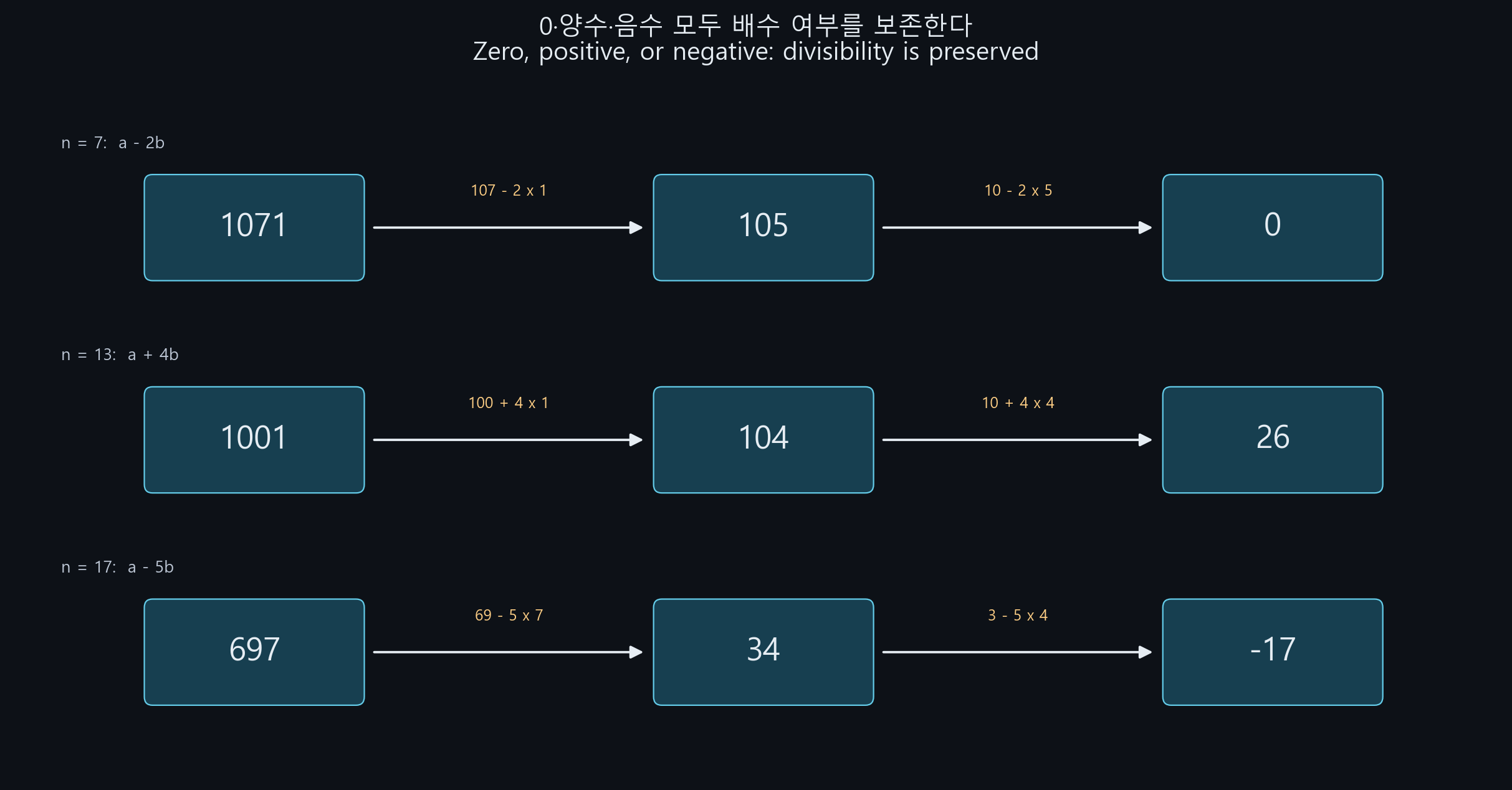
배수 판정 변환 예제. 7은 1071에서 105를 거쳐 0, 13은 1001에서 104를 거쳐 26, 17은 697에서 34를 거쳐 음의 17로 바뀐다.
이 규칙들은 수 전체를 직접 나눈 결과와 같은 예·아니요를 줍니다. 그러나 변환 전후의 수가 같은 것은 아니며, 몫이 같다는 뜻도 아닙니다. 지금은 배수 판정이라는 목적에 맞게 숫자를 바꾸어 검사하는 것입니다. 다음 편에서는 그 목적을 유지하는 조건을 증명하겠습니다.
7. 12·14·15·18은 이미 아는 규칙을 조합합니다
12의 배수는 3의 배수이면서 4의 배수입니다. 732라면 자리 숫자의 합 $7+3+2=12$가 3의 배수이고, 끝 두 자리 32가 4의 배수이므로 통과합니다.
14는 2와 7을 함께 봅니다. 203은 7의 배수지만 홀수여서 14의 배수는 아닙니다. 406은 짝수이고, 7의 규칙을 쓰면 $40-2\times6=28$이므로 7의 배수입니다. 따라서 406은 14의 배수입니다.
15는 3과 5를 함께 봅니다. 345는 끝자리가 5이고 자리 숫자의 합이 12이므로 통과합니다. 335는 끝자리가 5지만 합이 11이라 3의 배수가 아닙니다. 따라서 15의 배수도 아닙니다.
18은 2와 9를 함께 봅니다. 342는 짝수이고 합이 9이므로 18의 배수입니다. 351은 합이 9이지만 홀수여서 아닙니다. 6에서 “짝수와 3”을 묶었다면, 여기서는 “짝수와 9”를 묶습니다.
다만 이 조합을 아무 인수에나 적용하면 곤란합니다. 예를 들어 4와 6의 배수라는 조건만으로 24의 배수라고 결론 내릴 수는 없습니다. 12가 4와 6으로 모두 나누어떨어지지만 24의 배수는 아니기 때문입니다.
이번에 묶은 3과 4, 2와 7, 3과 5, 2와 9는 공통된 양의 약수가 1뿐입니다. 이런 관계를 서로소라고 합니다. 서로소인 두 수로 각각 나누어떨어지면 두 수의 곱으로도 나누어떨어집니다. 왜 이 조건이 필요한지는 최대공약수를 다루는 3편에서 다시 설명합니다. 지금은 사용하는 네 쌍이 이 조건을 갖춘다는 점을 확인하면 됩니다.
8. 멈출 지점을 정하고 전체 규칙을 연결하기
규칙을 반복하면 언제나 0에 도달할까요? 13의 규칙을 26에 적용해봅시다.
자기 자신으로 돌아옵니다. 이런 값을 고정점이라고 부릅니다. 26은 13의 두 배인데도 0이 되지 않습니다. 따라서 “0이 나올 때까지 반복한다”는 지침은 올바르지 않습니다.
7: 21 -> 0 = 7 x 0; 49 -> -14 = 7 x (-2)
13: 26 -> 26, a fixed point. Stop at the known multiple.
끝낼 기준은 이미 배수인지 아닌지 알아볼 수 있는 작은 수에 도착했는가입니다. 14가 7의 배수라는 것을 알면 14에서 멈춥니다. 12가 7의 배수가 아니라는 것을 알면 12에서 멈춥니다. 13이나 26을 알아보았다면 다시 계산할 이유가 없습니다.
다음 표는 이번 편의 전체 범위입니다. 앞의 예제로 뜻을 확인한 뒤 필요한 행을 찾아보는 용도로 쓰면 됩니다.
| 수 | 판정 기준 |
|---|---|
| 2 | 끝자리가 0·2·4·6·8 |
| 3 | 자리 숫자의 합이 3의 배수 |
| 4 | 끝 두 자리가 4의 배수 |
| 5 | 끝자리가 0·5 |
| 6 | 2와 3의 배수 |
| 7 | $a-2b$가 7의 배수 |
| 8 | 끝 세 자리가 8의 배수 |
| 9 | 자리 숫자의 합이 9의 배수 |
| 10 | 끝자리가 0 |
| 11 | 일의 자리부터 교대합이 11의 배수 |
| 12 | 3과 4의 배수 |
| 13 | $a+4b$가 13의 배수 |
| 14 | 2와 7의 배수 |
| 15 | 3과 5의 배수 |
| 16 | 끝 네 자리가 16의 배수 |
| 17 | $a-5b$가 17의 배수 |
| 18 | 2와 9의 배수 |
| 19 | $a+2b$가 19의 배수 |
표의 $a$는 앞부분 전체, $b$는 일의 자리입니다. 검사 결과에 0과 음의 배수도 포함됩니다. 이 두 약속을 표와 함께 기억하면 적용 과정에서 가장 흔히 생기는 혼동을 피할 수 있습니다.
9. 직접 바꾸어 확인해보기
2부터 19까지 다른 판정법을 골라보세요. 먼저 손으로 예측한 뒤 확인하면, 끝자리·자릿수 합·조건 조합 가운데 무엇을 사용하는지 구별할 수 있습니다. 21과 49를 7로, 26을 13으로 판정해 0·음수·고정점의 뜻도 확인해보세요.
새 수에서도 멈출 지점을 골라볼까요? 확인 버튼을 누르기 전에 1183과 1184를 13의 규칙으로 검사해보세요. 앞의 수는 $118+4\times3=130$, 다시 $13+4\times0=13$이므로 통과합니다. 뒤의 수는 $118+4\times4=134$, 다시 $13+4\times4=29$이므로 탈락합니다. 13과 29가 각각 13의 배수인지 알아보았다면, 두 계산 모두 여기서 멈출 수 있습니다.
배수 판정 실험
수를 바꾸고 판정법이 무엇을 확인하는지 살펴보세요.
10. 마무리
2부터 19까지를 한 번씩 다루었지만, 실제로 사용한 움직임은 몇 가지뿐입니다. 끝자리 일부를 남기고, 자리 숫자를 더하거나 빼고, 끝자리 숫자에 작은 계수를 곱하고, 이미 아는 조건들을 묶었습니다.
이제 계산에서 다음 질문이 생깁니다. 7에서는 왜 두 배를 빼고, 13에서는 왜 네 배를 더할까요? 17의 다섯 배는 어디서 나올까요? 앞부분을 버릴 때와 다시 더할 때, 원래 수의 무엇이 그대로 남을까요?
다음 편에서는 “같은 나머지를 가진다”는 말을 수학의 기호로 적고, 그 질문들을 하나씩 연결하겠습니다. 오늘 손으로 사용한 규칙이 내일은 직접 만들어낼 수 있는 규칙으로 바뀝니다.